In my previous post AutoCAD Map – Break, Trim and CleanUp I’ve blogged about the process to structure the drawings.
This blog is about classification and creation of the polygons.
 First we’ve created the centroids, AutoCAD points with attribute information in conformity with the IMGeo-model.
Such a centroid for a Wegdeel contains for example attributes like IDentificatie, objectBeginTijd, status, relatieveHoogteligging, typeWeg etc.
Next to it there are centroids for Spoorbaandeel, Waterdeel, Terreindeel, Kunstwerkdeel and Pand. These Pand-objects come from the Basisregistratie Adressen Gebouwen ( BAG ) by the way.
Further a Polygon Topology has to be created. Herewith we also use a Wizzard interface, where the structured linework are the links which the centroids are joined.
If there are lines not properly closed, than the Topology process comes with an error. Likewise if centroides are missing or double.
The Topology model is converted into MPolygons, with the IMGeo classification from the centroids copied to them. These MPolygons are migrated as polygons into the Oracle database using AcClassify.
more about that in the next post
 Using Boundary Break the topography and the parcel polygon can be brooken against each other. And using Boundary Trim the inside & outside can be seperated.
 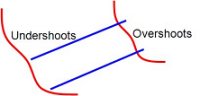 To migrate from linework in drawings into polygon-objects in a database, the lines that’ll become the boundaries of the polygons have to meet certain criterias.