
 AcClassify – an AutoCAD Map utility from Autodesk Consulting – developed to leverage expertise around the AutoCAD Map drawing-structure saving this into migration-profiles.
Working with AcClassify distinguish the following fases:
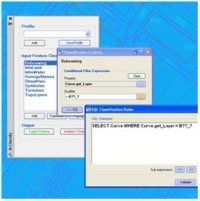
Classification-fase
Herewith we define features, how are they represented in the drawing and which specific requirements should they have to become such a feature.
for example the feature “building” consist of lineair objects with the layernamen = “B??_?”
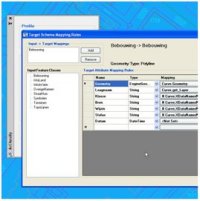 Mapping-fase
Herewith we connect the CAD-properties ( the input ) with the feature-properties in the database ( the output ), optionally “translating” for example colors into diameters.
AcClassify can create the schema-definition of the feature-tables in this fase, or an existing database-schema can be imported.
Migration-fase
In this fase the current drawing will be migrated into the database.
There is also a command to migrate a complete folder of equal drawings with the same migration-profile.
 AcClassify – an AutoCAD Map utility from Autodesk Consulting – can filter CAD-data, based on various CAD-properties. AcClassify can “recognize” for example pipes of a certain type. After that AcClassify can migrate those CAD-entities into their corresponding GIS-features and optionally “tanslate” for example color-codes into diameters or linetypes into materials.