
In the Feature-concept, data will not be stored as CAD-entities ( a line with a linetype on a layer with a color ), but as classified objects. Features are so called Real World Objects; a combination of geometry and attribute-data, like for example roads, parcels, buildings, cables, pipes etc.etc.
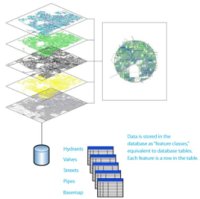 In contrast with previous versions of AutoCAD Map, geometies are no longer imported from SDF, Shape-files or Oracle-tables. We work directly on the files and databasetables in their own native format, without translation by import/export. Multiple users can connect to the same data at the same time, that is a big advantage and solves problems due to copies and different versions floating around.
Every layer in Map’s Display Manager refers to a single feature-class. These are not the traditional CAD-layers on the AutoCAD way, but “geospatial” layer, to display features thematically and in the proper display order.
Attribute-data or so called properties are part of the feature-definitions. These properties, together with the geometries stored in the same source, can be viewed and directly edited using the Data Table editor. Because we work with connected data, these modifications are directly commited into the source-data.
These attributes can be used as so called labels on the map. No static text, like in CAD, but dynamic labels, positioned by the software in the correct text height and rotation, fit for the scale in which the map is currently displayed.
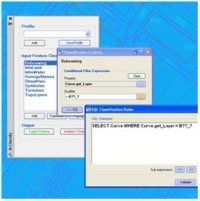 AcClassify – an AutoCAD Map utility from Autodesk Consulting – developed to leverage expertise around the AutoCAD Map drawing-structure saving this into migration-profiles.
 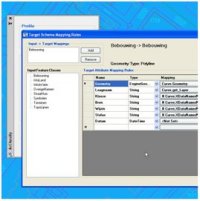 Mapping-fase
 AcClassify – an AutoCAD Map utility from Autodesk Consulting – can filter CAD-data, based on various CAD-properties. AcClassify can “recognize” for example pipes of a certain type. After that AcClassify can migrate those CAD-entities into their corresponding GIS-features and optionally “tanslate” for example color-codes into diameters or linetypes into materials.